 Setlist
Comments & Discussions
Bands make a lot of decisions. From my experience over the years, that mostly seems to happen in a chat during a coffee break at band practice, a half-remembered comment while packing up after a gig, or a WhatsApp thread everyone forgets. The end result is three weeks later nobody can remember what was agreed, and scrolling back through 400 messages to find out is hardly ideal!
Setlist has two features that work together here. The comment composer lets you link any part of your band's data into a conversation, and Discussions give a conversation a permanent home, and most importantly, a written-down outcome that you can refer to later.
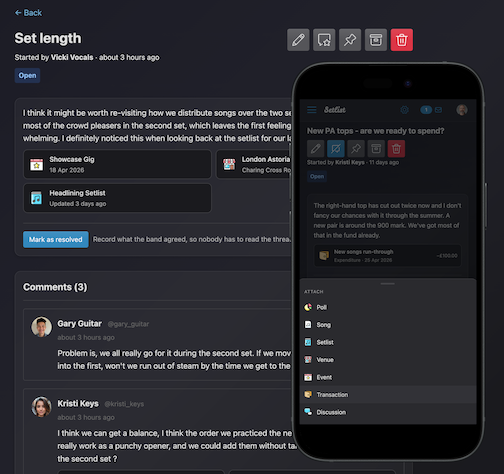
The comment composer
You'll find the same composer form everywhere comments appear (which is most things in Setlist). It's just a regular box to type in, but there are a couple of things that make it particular useful in the context of your band.
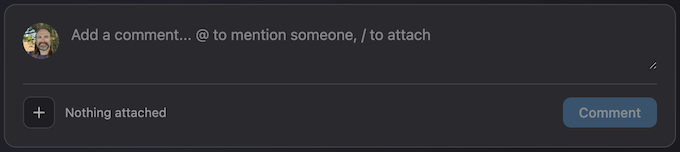
Mentioning people
Firstly, you can type @ followed by a name and you'll get a dropdown of your bandmates. Pick one and they get a notification. This works the same way in a discussion's opening post as it does in a comment, so you can pull someone into a conversation from the start.
Attaching things
This is the newer part. Click the + button at the bottom-left of the composer, and you'll get a picker showing everything you can link to:
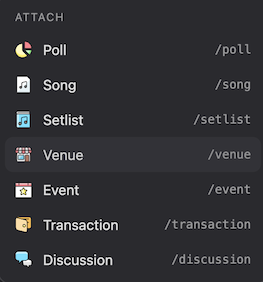
Choose a type and you'll get a search box for it, with useful details attached to each result to help you pick the right thing. A song therefore shows its artist and duration, an event shows its date and status, a transaction shows the amount and whether it's income or expenditure etc.
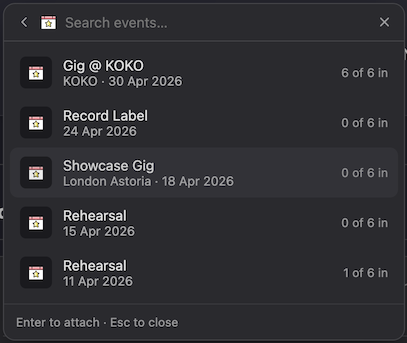
Press Enter (or click) to attach, and Esc to close. On a phone it opens as a bottom sheet instead of a pop-over, and auto-closes after each pick.
/ at the start of a line or after a space and the same picker opens, filtered as you type: /song, /setlist and so on all work. It only triggers after whitespace, so writing D/F# or 3/4 in a comment won't set it off.
Whatever you've attached appears as a row of small chips under the text while you're still writing, and you can remove one before posting if you pick the wrong thing.
What it looks like once posted
Once the comment is posted, those chips become proper cards with a link through to the record, an icon (or the album artwork, for songs), and a line of useful detail:
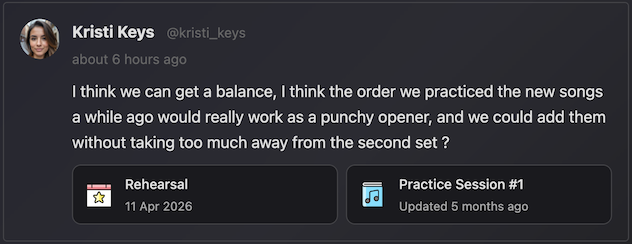
If the thing you linked to is later deleted, the card doesn't turn into a dead link - instead, it greys out into a "this item has been removed" placeholder. This means that even if you e.g. delete a song, it never removes the conversation that was about it.
Mentioned in
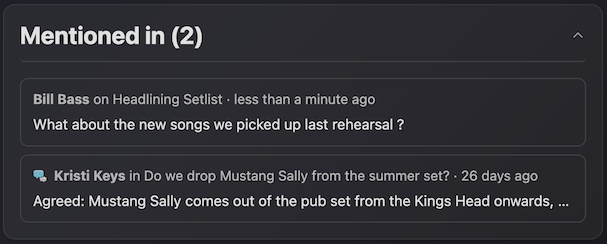
The really useful bit is that this works in both directions: If you attach a song to a discussion, that discussion now shows up in a Mentioned in section on the song's details page. This means that over time, a song (or any other "thing") will accumulate the history of everywhere it's been talked about - the discussion about dropping it, the comment on the setlist it appeared in, or the poll where the band voted on it etc.
Discussions
A discussion is a just a thread of comments with a title, an opening post, and (when the band has made its mind up) a resolution.
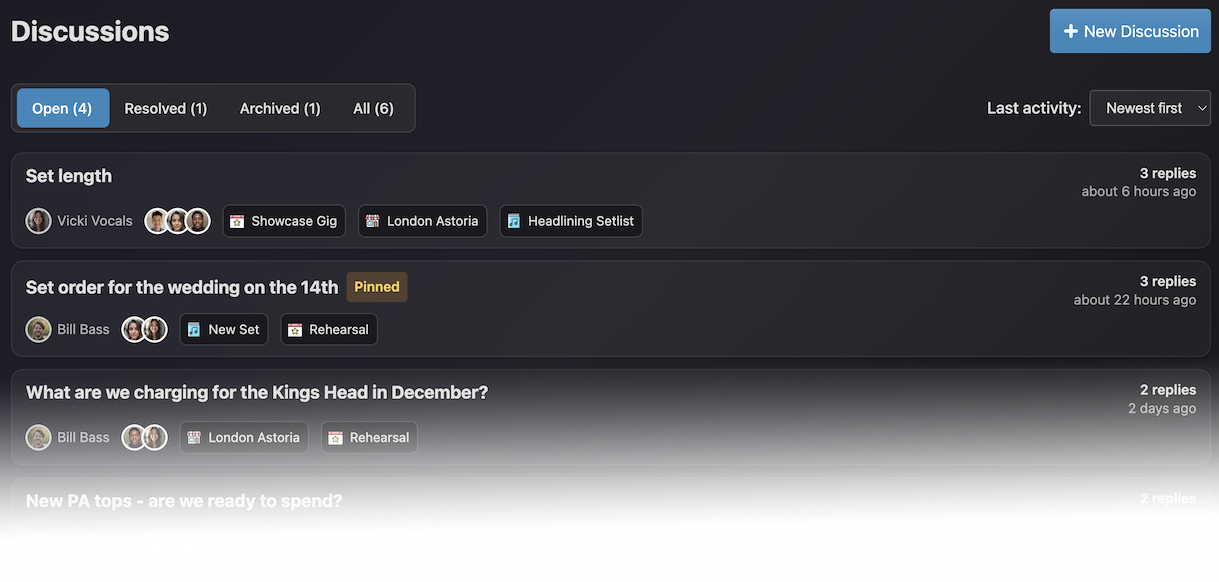
You'll find Discussions in your band's homepage under "Band Management", and also in the band dropdown in the header. Pinned discussions (covered below) also appear as a card on the band homepage.
Starting one
Click New Discussion. Only the title is required, and I'd suggest it's worth phrasing it as the question you want answered: "What do we charge for the Kings Head?" is better than something like "Kings Head" when you're searching for it later.
The opening post uses exactly the same composer described above, so you can @ people and attach entities as usual. Writing out the question and linking the songs and the gig you're discussing makes things a lot easier to keep track of.
The discussion page
The discussion page is where it all happens:
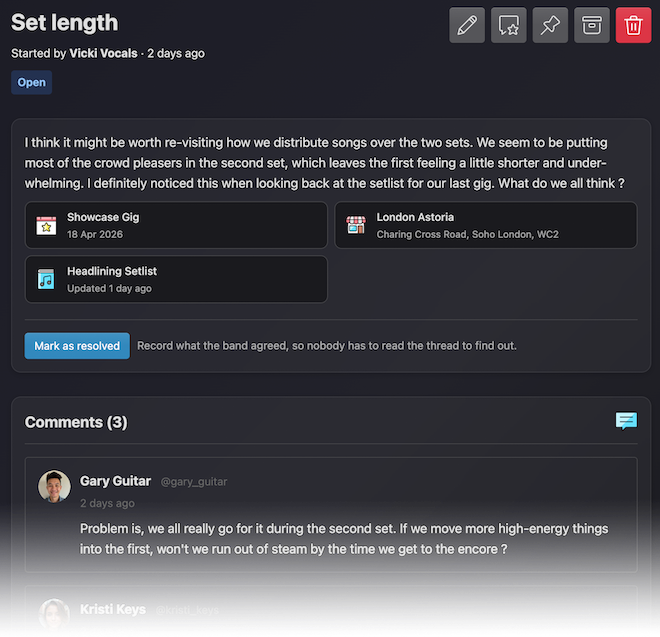
At the top you'll see the title, who started it, and a set of badges (Open, Resolved or Archived, plus Pinned). The buttons in the header are:
- Edit (pencil) - edit the title, the opening post and attachments inline. Author (or band admin) only.
- Follow / Mute (starred chat icon) - your own subscription to the thread. More on this below.
- Pin / Unpin - puts the discussion on the band homepage.
- Archive - hides it from the main list without losing it.
- Delete - permanently removes it.
Below that is the opening post, attachment cards (if any), and then the comment thread.
Recording the outcome
This is the part that makes a discussion worth having over a group chat. When the band has agreed on something, click Mark as resolved and write down what was decided:
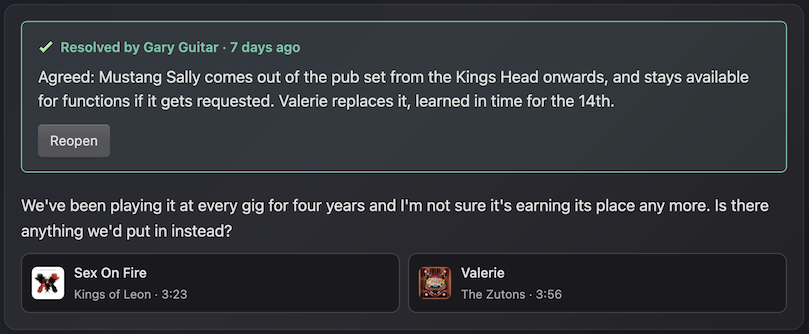
The resolution then sits at the top of the page, above the conversation, because it's the answer and it saves everyone from having to read through all the replies to find it. It also records who resolved it and when, and it's what shows up in the summary on the band homepage card. You can also Reopen a discussion at any time if it turns out you you need to re-visit the decision.
Following and notifications
Everyone in the band gets a notification when a new discussion is started (assuming they've got that category enabled in their preferences). You'll only see Replies though if you decide to follow the discussion. This means that long back-and-forth discussions between two members won't spam the rest of the band.
- Start it
- Comment on it
- Get
@mentioned in it, either in the opening post or in a reply
If you'd rather not hear about it any more, click the Mute button and you won't get any further notifications. Note that this applies for all further activity on the discussion, so commenting or being mentioned later won't re-subscribe you. You can also turn the "New Discussions" notification category off entirely in your notification preferences.
Pinning, archiving and deleting
Pinning puts a discussion on the band homepage where everyone will see it. There's a limit of three pinned at once, which is a deliberate decision - the idea is that you keep this for really important discussions only.
Archiving is simply a tidy-up option. An archived discussion gets taken out of the main list (and out of the attachment picker) but keeps everything, so what was decided stays on the record.
Deleting removes it and its replies for good. Be careful with this - it will completely remove a discussion, which is usually not what you want. Consider archiving it instead where it won't clutter up the pages but will still keep it as a record.
A few tips
- Titles are more useful as a question. "Do we keep the Friday residency?" tells everyone what's being asked.
- Attach all the things! Attachments are a really useful way of finding the discussion in future, from whichever end you approach it.
- Resolve things, even the small ones. A one-line resolution like "Agreed: dropping Mustang Sally, adding Valerie for the next gig" is the real value of the feature.
- Archive, don't delete. Old decisions (or even things without a resolution) are worth keeping. Archiving gets them out of the way without chucking away the context.